


The Think Big Creators Portal gives represented creators one clear place to manage their work with TBC
See what needs your attention, check upcoming campaign dates, open briefs and contracts, and keep track of money due without searching through old emails or messages.
Everything you need to stay on top of your creator business.
As your campaigns grow, so does the amount of information you need to manage. The Creator Portal is managed by your dedicated account manager, and brings the important parts together in one simple, private workspace.
Know What Needs Your Attention
Your home screen highlights your next action, from reviewing a brief or submitting a draft to preparing for an upcoming go-live date.
You’ll see the work you need to do, not the internal work being handled by the TBC team.

Keep Every Campaign Organised
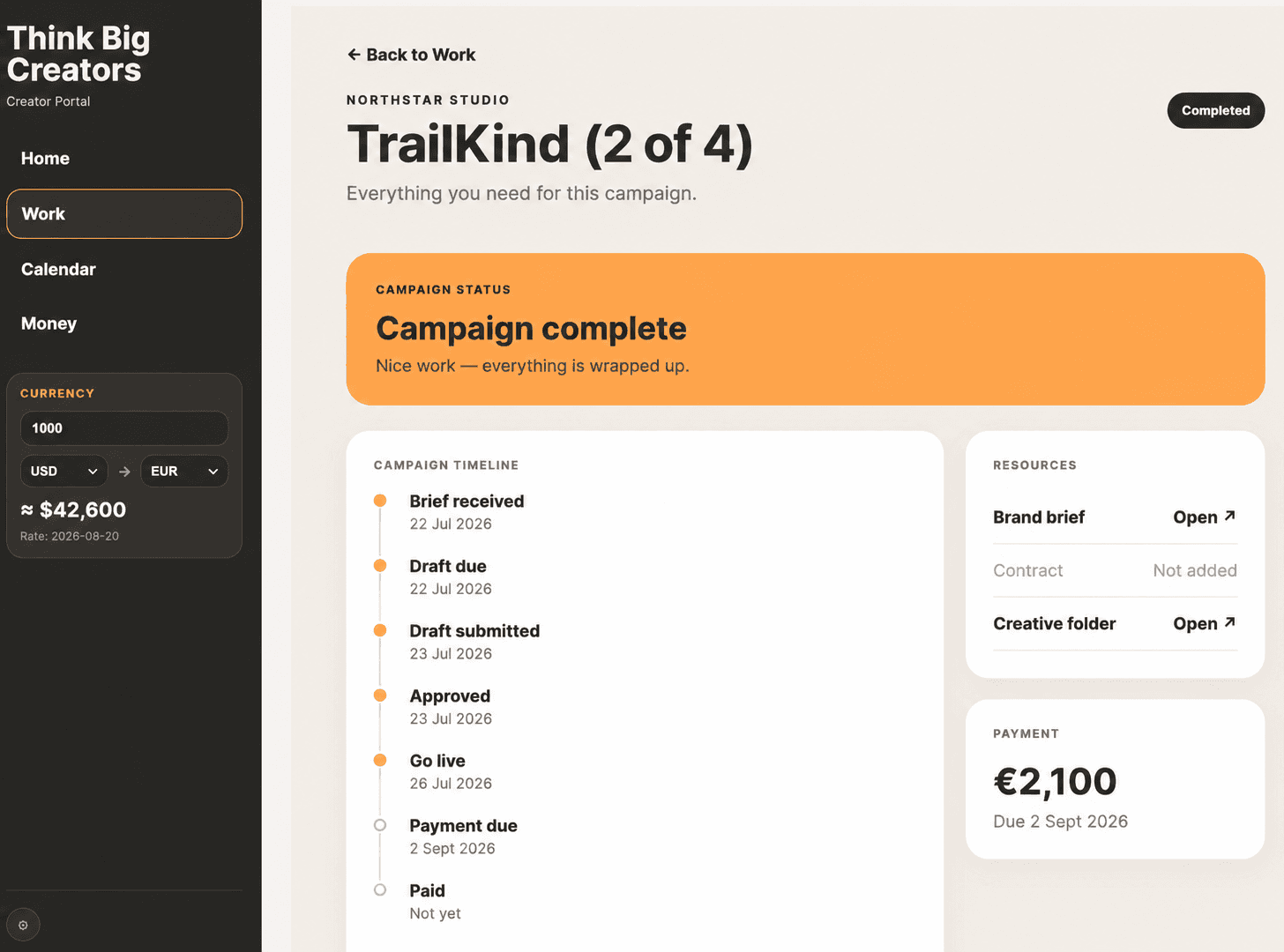
Open any campaign to see its timeline, key deadlines, creator fee and available resources, including:
Brand briefs
Contracts
Creative folders
Script and draft deadlines
Approval and go-live dates
Expected payment dates
See Your Whole Schedule
The campaign calendar brings booked campaigns, draft deadlines, go-live dates and private commitments into one view.
Select any campaign directly from the calendar to see its details without leaving the page.

Understand Your Earnings
The Money area gives you a clear view of:
Your lifetime earnings with TBC
Money currently owed to you
Your next expected payment
Payments awaiting settlement
Completed and paid campaigns
Any commission payments due to TBC
Where you work in different currencies, the portal also provides an approximate currency conversion to help you understand your totals at a glance.

How to log in
Select Open the Creator Portal and sign in using the email address registered with Think Big Creators.
If this is your first visit, use the invitation or password-setup link sent to your email. Once you have created your password, you can return to the portal and log in directly at any time.
If you forget your password, select Forgot password on the login screen and follow the instructions sent to your registered email address.
Your portal is private. You will only see campaigns and information connected to your own creator account.
Make it part of your working day
We recommend bookmarking the Creator Portal in your browser and placing it alongside the tools you already use to run your business such as YouTube Studio and your email inbox.
That gives you a simple creator-business setup:
YouTube Studio for your content and audience.
Email for communication.
The TBC Creator Portal for campaigns, deadlines, resources and money.
Checking these three places regularly will help you stay organised, avoid missed deadlines and understand exactly what is happening across your commercial work.
Need help?
If something appears incorrect, a resource is missing or you cannot access your account, contact your Think Big Creators account manager. The team can check your account and update the relevant information.